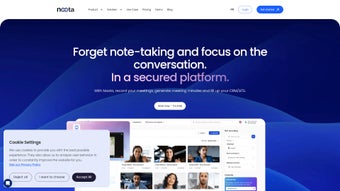

Download Noota – AI‑Powered Meeting Assistant for Seamless Note‑Taking
Overview
Noota is an innovative, web‑based AI meeting assistant that transforms the way professionals capture and leverage meeting content. By combining real‑time transcription, automatic summarisation, and intelligent conversation insights, Noota eliminates the manual effort traditionally associated with note‑taking. Whether you are a sales leader trying to close deals faster, an academic researcher documenting interview data, or a project manager coordinating cross‑functional teams, Noota delivers a secure, free‑to‑use platform that records, transcribes, and organises every spoken detail.
The tool integrates directly with popular CRMs and productivity suites, ensuring that critical insights are instantly actionable. Its AI engine continuously learns from each session, offering contextual prompts and highlighting key decisions, action items, and sentiment trends. With no credit‑card required for the free tier, Noota positions itself as an accessible solution for businesses of all sizes, aiming to boost productivity, improve decision‑making, and reduce the administrative overhead that often hampers meeting efficiency.
Core Features of Noota
- Live Transcription Engine: Captures every word spoken during a meeting with near‑real‑time accuracy, supporting multiple speakers and accents.
- Automatic Summaries: AI‑generated concise meeting minutes that highlight decisions, action items, and key discussion points.
- Conversation Intelligence: Sentiment analysis, keyword extraction, and speaker identification to surface business‑critical insights.
- CRM & Tool Integration: Seamless export of notes and transcripts to Salesforce, HubSpot, Notion, Google Workspace, and more.
- Secure Cloud Storage: End‑to‑end encryption for all recordings and transcripts, complying with GDPR and CCPA standards.
- Real‑Time Guidance: Contextual prompts that suggest follow‑up questions, highlight missed topics, and keep the agenda on track.
- Multi‑Platform Access: Web app accessible from Windows, macOS, Linux, as well as mobile browsers on Android and iOS.
- Free Tier with Unlimited Meetings: No credit‑card required; premium plans add advanced analytics and custom branding.
- Export Options: Download transcripts as .txt, .docx, or .pdf, and embed summaries directly into shared documents.
- Collaboration Hub: Invite teammates to view, comment, and edit meeting notes in real time.
Installation & Usage Instructions
Getting started with Noota is intentionally frictionless. Because it is a cloud‑native web application, there is no traditional software download or installation required on your desktop. Follow these steps to launch your first AI‑assisted meeting:
- Create a Free Account: Visit Noota’s homepage and click the “Sign Up Free” button. Provide an email address, set a secure password, and verify your account via the confirmation link.
- Configure Your Workspace: After logging in, you’ll be guided through a quick onboarding wizard. Choose your preferred language, upload your company logo (optional), and connect any CRM or collaboration tools you wish to integrate.
- Schedule a Meeting: Click “New Meeting,” give it a descriptive title, set the date and time, and invite participants by email. Noota generates a unique meeting link that can be shared via calendar invites or messaging apps.
- Start Recording: At the scheduled time, click “Start Session.” Noota automatically captures audio from your microphone and any connected participants. The AI transcription begins instantly, appearing in a live sidebar for all attendees to follow.
- Leverage Real‑Time Guidance: As the conversation progresses, Noota surfaces prompts such as “Add an action item” or “Highlight decision point.” Click the prompt to tag the content, which will later be highlighted in the summary.
- End & Review: When the meeting concludes, click “Stop Recording.” Noota finalises the transcript, generates a summary, and stores everything securely in your dashboard.
- Export & Share: From the meeting page, choose “Export.” Select your desired format (PDF, DOCX, TXT) or push the notes directly to your CRM. You can also grant view‑only access to stakeholders who were not present.
For mobile users, the same workflow is available through a responsive web interface. Simply open the meeting link on any Android or iOS browser, grant microphone permissions, and you’ll have the full suite of AI features at your fingertips. Noota also offers browser extensions for Chrome and Edge that embed a “Start Noota” button directly into video‑conference platforms like Zoom, Microsoft Teams, and Google Meet, allowing you to launch transcription without leaving the meeting environment.
Compatibility, Pros & Cons
Because Noota runs entirely in the cloud, it is compatible with any operating system that supports a modern web browser. Whether you work on Windows 10/11, macOS Ventura, Linux distributions, or mobile devices running Android 9+ or iOS 13+, Noota delivers the same performance and feature set. The platform is optimized for Chrome, Firefox, Safari, and Edge, ensuring low latency transcription and secure data handling across environments.
Pros
- Fully automated note‑taking eliminates manual transcription errors.
- Real‑time AI guidance keeps meetings focused and productive.
- Free tier provides unlimited meetings without a credit‑card.
- Robust integration ecosystem (CRM, Google Workspace, Notion).
- End‑to‑end encryption and compliance with GDPR/CCPA.
- Cross‑platform accessibility via any modern browser.
- Action‑item tagging and sentiment analysis add business intelligence.
- Export options support multiple file formats for downstream workflows.
Cons
- Reliance on internet connectivity; offline use is not supported.
- Advanced analytics (e.g., custom dashboards) are locked behind paid plans.
- Voice recognition accuracy may vary with heavy background noise.
- Limited native mobile apps; functionality is browser‑based on phones.
- Initial onboarding can be overwhelming for non‑technical users.
Overall Rating: 4.5/5 – Noota delivers a compelling AI‑driven meeting experience that dramatically reduces the time spent on note‑taking while providing actionable insights. The free tier’s generous limits make it an excellent choice for startups and small teams, though larger enterprises may benefit from the premium analytics suite.
Frequently Asked Questions
Is Noota really free, and are there hidden charges?
Yes, Noota offers a completely free tier that allows unlimited meetings, transcription, and basic summarisation. There are no hidden fees or credit‑card requirements. Premium features such as advanced analytics, custom branding, and priority support are optional and billed monthly.
How secure is my meeting data on Noota?
Noota employs end‑to‑end encryption for all audio recordings and transcripts. Data is stored in GDPR‑ and CCPA‑compliant servers, and you retain full ownership of your content. Access controls let you decide who can view or edit each meeting.
Can Noota integrate with my existing CRM?
Absolutely. Noota provides native connectors for Salesforce, HubSpot, Zoho, and many others. You can also use Zapier or custom webhooks to push transcripts and action items directly into any CRM or project‑management tool.
What languages does Noota support for transcription?
The core engine currently supports English, Spanish, French, German, and Mandarin with high accuracy. Additional languages are being rolled out quarterly, and you can request specific language support via the help centre.
Do I need a powerful computer to run Noota?
No special hardware is required. Since processing occurs in the cloud, any device that runs a modern browser (Chrome, Firefox, Safari, Edge) can host a Noota session. A stable internet connection is the only prerequisite.
Conclusion & Call to Action
In today’s fast‑paced business environment, capturing every nuance of a conversation can be the difference between a missed opportunity and a closed deal. Noota’s AI‑driven transcription, real‑time guidance, and seamless integration make it a standout solution for anyone looking to streamline meetings, boost productivity, and turn spoken words into actionable data. The free tier lowers the barrier to entry, allowing teams of any size to experience the benefits without financial commitment. While offline capabilities and some advanced analytics remain premium features, the core functionality already delivers a substantial ROI by eliminating manual note‑taking and reducing post‑meeting follow‑up time.
Ready to experience a smarter way to meet? Sign up for Noota today – no credit card needed – and start converting every meeting into clear, searchable, and shareable insights. Empower your team, keep decisions transparent, and let AI handle the paperwork while you focus on what truly matters.



.png)



